

The customer portal

Your business.
Right in their hands.

One link, your brand: your customers book appointments, order products and keep track of their loyalty rewards.

Customer portal

Step by step.

Home

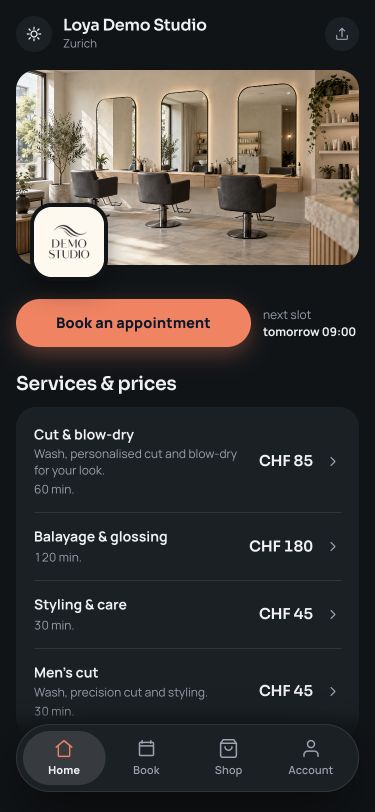
Your brand, your services.

Cover image, logo, services with prices and the next available slot — all on one page.

Loya customer portal: home

What your customers can do

More than booking an appointment.

Two ways to find the right appointment

Guided booking takes customers step by step through choosing a person, a time of day and an appointment. The overview shows the team and available times side by side. You choose the booking view that suits your business.

Shop with collection

Choose products online and collect them during a visit. Payment is made at your business. The order stays visible in the customer account.

Extras when booking

Add-on services, such as an intensive treatment, complement the appointment. Customers see the extra cost and time before confirming.

Relevant product suggestions

Product questions during booking help customers choose suitable items. They can add their care products to the appointment as they book.

Loyalty rewards in one place

Stamp cards and customer tiers show progress towards the next reward. Customers can see how each return visit counts.

A personal customer account

Appointments, orders and loyalty rewards stay close at hand. Customers log in with a six-digit email code, without a password.

Good to know

Customer portal questions.

Do my customers need an app?

No. Your booking portal runs in the browser — a link or QR code is all it takes. It works on phones, tablets and computers, without a download.

How do customers log in without a password?

With their email address and a six-digit code. A customer account without a password.

How do customers pay for shop products?

When collecting them at your business. Orders are set aside for the booked appointment.

Your next step

Your business.
Your own portal.

Try free for 5 days. Then CHF 45 per month.